
An analogy to describe JavaScript and its relationship to HTML and CSS.
- HTML is like the skeleton of the body, providing the basic structure.
- CSS is like the skin, defining the appearance and style.
-
JavaScript is like the nervous system and muscles, allowing for
interactivity and movement.
So, HTML provides structure, CSS dresses and decorates, and JavaScript makes the page interactive.
Explain control flow and loops using an example process from everyday life, for example, 'waking up' or 'brushing your teeth' (but not those).
- Control Flow: This is the sequence of steps you follow to get ready, such as getting out of bed, getting dressed, having breakfast, and gathering items.
- Loops: These are used to repeat actions until a condition is met. For instance, checking and packing your bag repeatedly until you have all necessary items before leaving for work.
In view of this, control flow organizes your routine, while loops
help ensure you complete tasks like packing thoroughly.
Describe what the DOM is and an example of how you might interact with it.
- The DOM (Document Object Model) is an interface that browsers use to represent and interact with the structure of an HTML. It models the document as a tree of objects, where each node represents a part of the document, such as elements, attributes, and text.
- Some examples like: Selects Elements: Finds the paragraph and button in the HTML. And Changes Content like: Updates the paragraph's text when the button is clicked.
Explain the difference between accessing data from arrays and objects.
Arrays
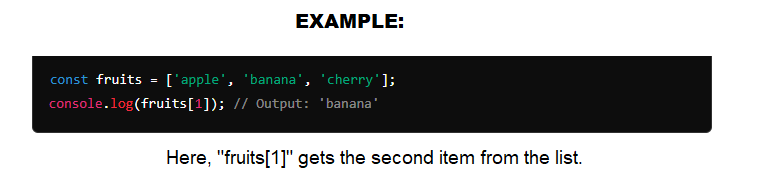
- Think of Arrays as a List: Imagine a list of items like a shopping list. Each item in the list has a specific position, starting from 0.
- Access by Position: To get an item, you just say its position in the list. For example, if you want the second item in the list, you look at position 1.
Objects
- Think of Objects as a Library Catalog: Imagine a library catalog where each book has a specific title and author. Each book entry has a unique name (the title) and details (like the author).
- Access by Name: To find out who wrote a book, you use the book's title to look up its author.
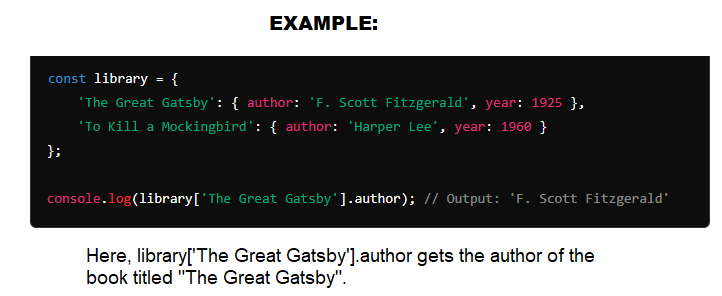
Tips: >>>> Arrays: Like a list where you access items by their position. >>>>Objects: Like a library catalog where you access details by the name (title). >>>> Arrays are used for ordered lists, while objects are great for organizing data with specific names or keys.
Explain what functions are and why they are helpful.
- A function is a block of code that performs some operation. Think of a function as a recipe for making a dish. Just as a recipe has a set of instructions to follow to create a meal, a function has a set of instructions (code) that performs a specific task. They're helpful because they allow you to reuse code, keep your code organized, and minimize errors.